GCP Review Module
The Google Cloud Platform Review Module allows you to continually run basic reviews on your Google Cloud Organizations. You can use the outcome of the reviews to identitfy common usage gaps and improve the quality of use ofyour Google Cloud Platform Organizations. The review is based on Incentro best practise use of Google Cloud Platform.
Concepts
Example of a review
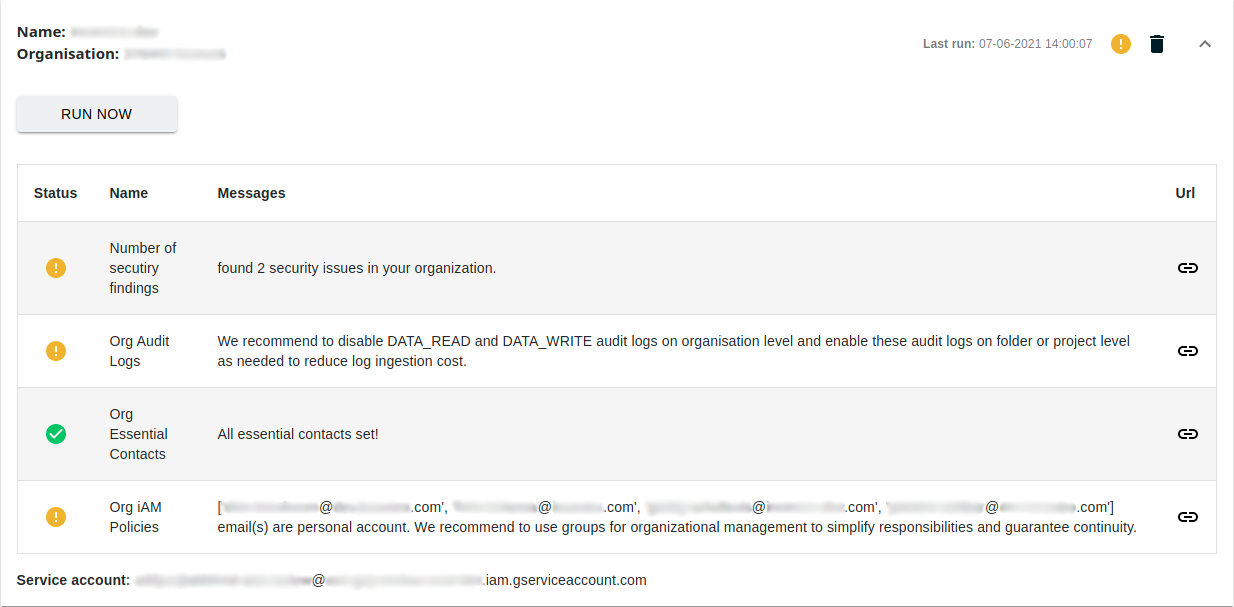
A review
The GCP Review module allows tenants to scan multiple Google Cloud Platform Organizations on organizational level policies and configurations. A review provides high level insight in organization configuration and returns suggestions based on Incentro best practices if any violations are detected. The module currently support the following reviews:
- Organization IAM policies
- Organization Data Access Audit log policies
- Essential Contacts review
- Security Command Center enablement and findings
- Security Command Center asset discovery enablement
To perform these checks, every time you configure a review we will generate a service account and use this service account to perform the check in your environment. In order to prevent abuse and maximize security, a service account generated by the review is tightly scoped to this review and can not be re-used anywhere else. By default, this service account has no access to your environment. It is your responsibility to give this service account the correct scopes in your organization.
Review service account scopes
The scan is performed by our backend services with a private service account that is created specifically for this task. When a review has been created, the user is responsible for giving the newly created service account access to the organization the review has been created for with the following roles on organizational level:
- Essential Contacts Viewer
- Organisation Role Viewer
- Security Centre Findings Viewer
- Security Centre Settings Viewer
It is possible to only give a subset of these scopes to the service account in your organization policies. The results will let you know if the check can not be performed.
Results
The results of a review describe the current state of your Google Cloud Platform organization policies. Each review topic performed will return the following information:
- Messages: Any recommendations or other insights we have discovered during the review
- URL: We generate an URL based on our findings where you can directly implement our recommendations or find more information
-
Status: A status object that displays one of the following settings:
- 1: The review has been completed succesfully and we have no remarks on the configurations.
- 2: The service account does not have sufficient access to perform this check.
- 3: The review is currently running or will run soon.
- 4: We have found recommendations on how to improve the usage of this service.
Review cadance
Each configured review will be executed automatically every hour. It is also possible to run a review manually. The results of the review will be updated dynamically.
Multiple Google Cloud Organizations
The review module allows you to set up multiple reviews for separate Google Cloud Platform organizations. This can be useful if you have multiple GCP organizations and want to have a single view of their usage.
Guides
In order to create a GCP Organization review, you must have correct permissions in your Google Cloud Platform Organization. Make sure you are allowed to assign roles to service accounts in the top-level IAM permissions of your Google Cloud Platform Organization.
Retrieve your GCP Organization ID
You need your Google Cloud Platform Organization ID in order to configure a review.
- Go to the Google Cloud Console
- At the top of the page, click the project selection drop-down list.
- On the Select from window that appears, click the organization drop-down list and then select the organization you want.
- On the right side, click More, then click Settings.
- The Settings page displays your organization’s ID.
Configure the review in ACE
- In your ACE environment, use the left menu to go to GCP Reviews.
- Click ADD A REVIEW in the top left
- Fill out the Name of your review. We recommend to use your GCP Organization name for clarity, but it is free to name as you see fit.
- Fill out your Organisation ID. This is the Google Cloud Platform organization ID from the previous step and is a numerical code.
- Click SUBMIT to create the review
The review has been created and will run every hour. But it will not have access to your Google Cloud Platform Organization by default. In the review screen, open the review you just created and find the email address of the service account. You will need this for the next step.
Giving the review access to your Google Cloud Platform Organization
To allow the review to check your configuration, you need to provide the service account that has been created for this review access to your Google Cloud Platform Organization.
- Go to the Google Cloud Console
- At the top of the page, click the project selection drop-down list.
- Select your organisation
- Go to the IAM Permissions page
- Click Add and then enter the email address of the service account of the review that has been created in the previous step
-
Add (a subset of) the following roles:
- Essential Contacts Viewer
- Organisation Role Viewer
- Security Centre Findings Viewer
- Security Centre Settings Viewer
-
Click Save to store your configuration. The review now has access to perform it’s checks.
In ACE, you can click on RUN NOW to perform the review immediatly. The review will be executed automatically every hour.